
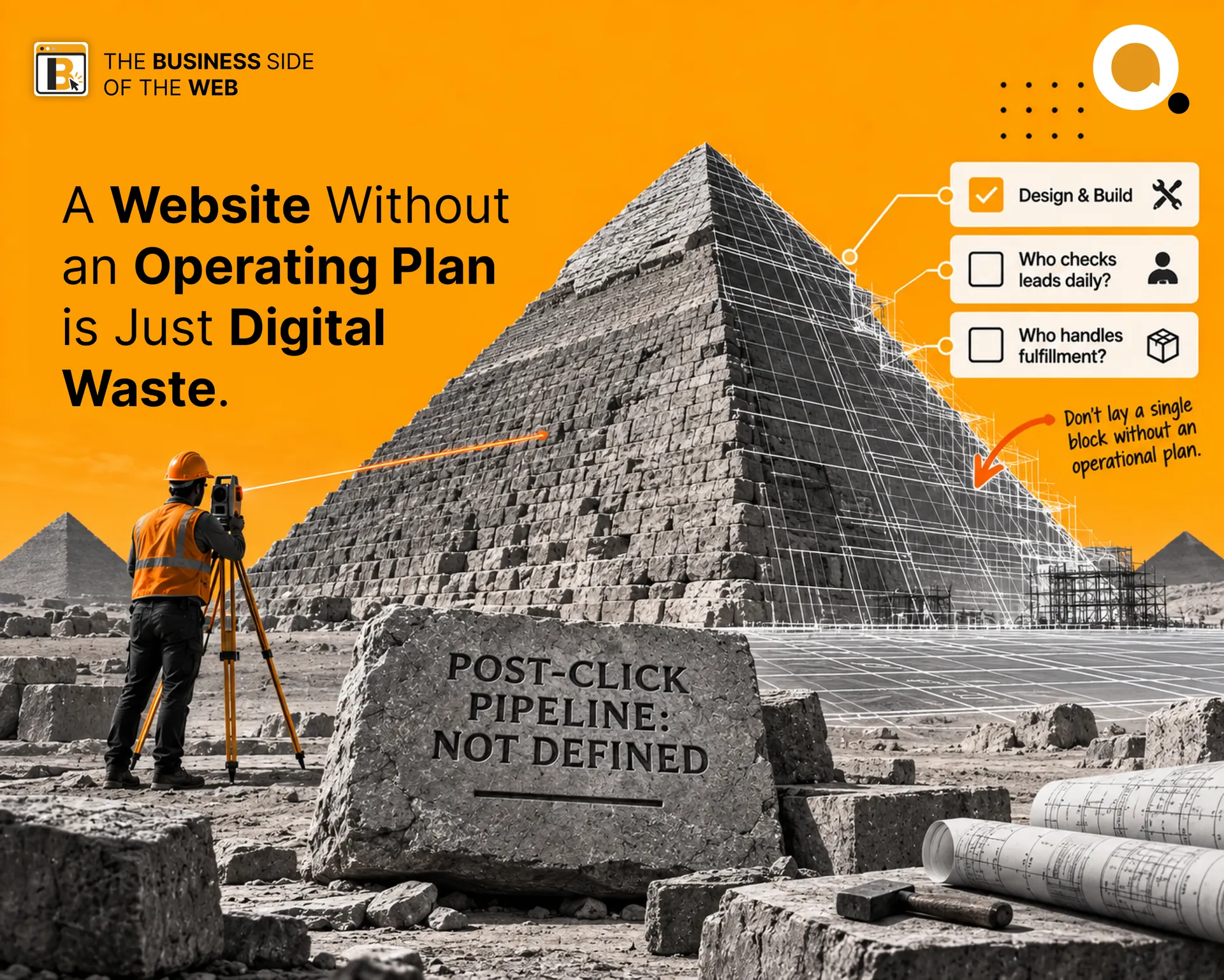
Here is a scene that plays out in businesses every single week
A company spends four months, dozens of review meetings, and several lakhs of rupees building a brand-new website. The developer fixes the final bug, uploads the files to the live server, tests the contact form once, and sends an email:
“Congratulations! The website is officially live.”
The leadership team pops open a bottle of champagne. High-fives all around. The link gets posted to LinkedIn and WhatsApp stories. Everyone takes a deep breath, closes their laptops, and moves on to their regular day-to-day work.
Fast forward six months.
The blog hasn’t been updated since launch week. Three test enquiries from real prospective clients are sitting unread in a generic info@ inbox nobody checks. A payment gateway update failed quietly three weeks ago, meaning checkout is throwing an error on mobile.
Worst of all? Sales hasn’t seen a single closed deal originate from it.
The managing director looks at the screen with quiet disgust and declares: “We tried having a website. It doesn’t work for our industry.”
A website project does not end when the developer says “it’s live.” That is the exact moment the business finally has to start running it.
A website is not a billboard you plant on a digital highway and drive away from. It is an operating system, a communication channel, and an active business asset.
If your business isn’t prepared to handle the traffic, respond to the leads, fulfil the orders, and maintain the infrastructure, you don’t need a website yet.
You need an operational plan.
Let’s walk through the entire cycle so you never build a digital front door your business cannot support.
First, Remember Why You’re Building It

Before you open Figma, draft copy, or talk to an agency, go back to the single reason you wanted a website in the first place.
If you’re still asking whether your business actually needs one, start with our first guide: It’s High Time Your Business Needs a Website. That article breaks down the foundational math: trust signals, owned digital real estate versus rented social media land, and turning paid attention into retained capital.
Once you know you need one, you must answer an unapologetic question:
What job is this website hired to do?
As we established in What Kind of Website Do You Actually Need?, a website is never a category. It is an employee with a job description:
Presence: Make your business easily discoverable and confirm you are real.
Trust: Win the contract before the client picks up the phone by demonstrating undeniable proof.
Leads: Filter out low-budget tire-kickers and hand high-intent buyer profiles directly to your sales team.
Sales: Handle the end-to-end retail machine: selection, cart, checkout, payment, and inventory deduction.
Bookings: Eliminate back-and-forth messaging by letting clients schedule and confirm directly against staff availability.
Portal: Provide authenticated dashboards where clients or vendors access documents, data, and workflows.
Before proceeding, write down this single sentence and pin it to your desk:
“My website exists to _______________ for my business.”
If you cannot fill that blank with a clear, measurable business outcome, you are not ready to plan a build. The job dictates the architecture. The pages come last.
Plan the Website Before Designing the Screen
Once the job is defined, resist the urge to sketch wireframes or pick brand colors.
A website plan is not a collection of page names written on a napkin. It is an operational equation:
Website Plan = Job + Features + Pages + Systems
Let’s break that down:
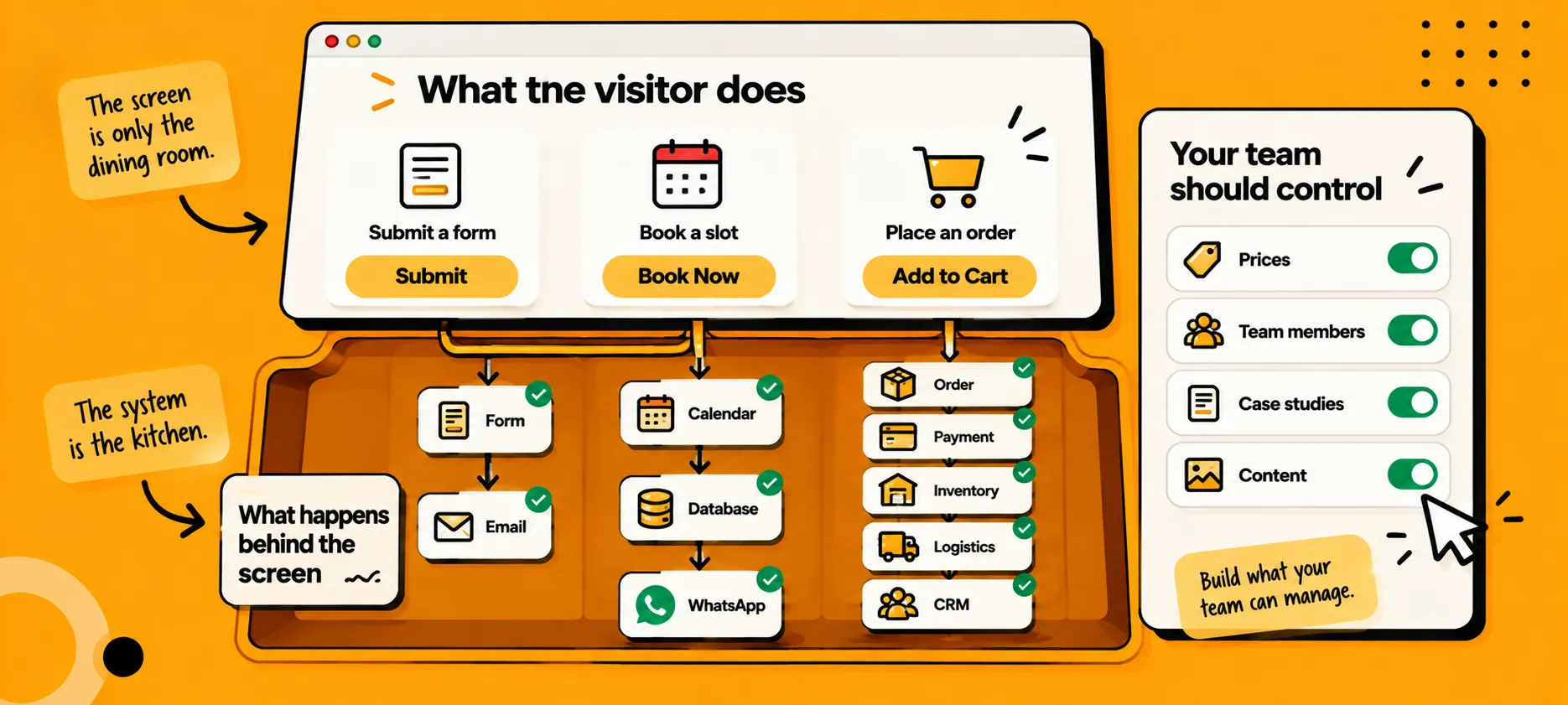
Features = What the Visitor Needs to Accomplish
If the job is Bookings, the visitor doesn’t just need a contact form. They need an interactive date-picker, timezone matching, and instant slot confirmation. If the job is Lead Generation for High-Ticket B2B, the visitor needs clear service scope pages, verifiable case studies, and a qualification form that routes based on company size.
Systems = What Must Happen Behind the Screen
The screen is only the dining room. The system is the kitchen:
A basic contact form needs an email delivery pipeline and spam filtration.
A booking flow needs calendar two-way synchronization, database updates, and SMS/WhatsApp notifications.
An e-commerce store needs inventory locking, payment gateway webhooks, shipping API calls, and automated tax invoicing.
Simple Action → Simple System (Form → Email)
Complex Action → Complex System (Order → Payment → Inventory → Logistics → CRM)
Admin Control = What Your Team Needs to Touch Daily
Never build functionality your team cannot independently manage. If updating a service price, adding a team member, or posting a case study requires paying a developer ₹5,000 and waiting four days, your website will stagnate.
Ask yourself these four questions before signing any development scope:
What exact business job does this website perform?
What specific tasks must the visitor complete?
What data systems and automations must run behind that screen?
What controls must your internal team own on a weekly basis?
One-line punch: Don’t design the screen until you understand the system behind it.
Plan the Money Around the Business
Every bad website experience starts with an unrealistic budget structure.
Most business owners take their total allocated capital and hand 100% of it over to a development agency on day one. Then they are shocked when their shiny new asset produces zero revenue because they have no capital left to maintain or promote it.
In How Much Should You Spend On Your Website?, we introduced the budgeting anchor:
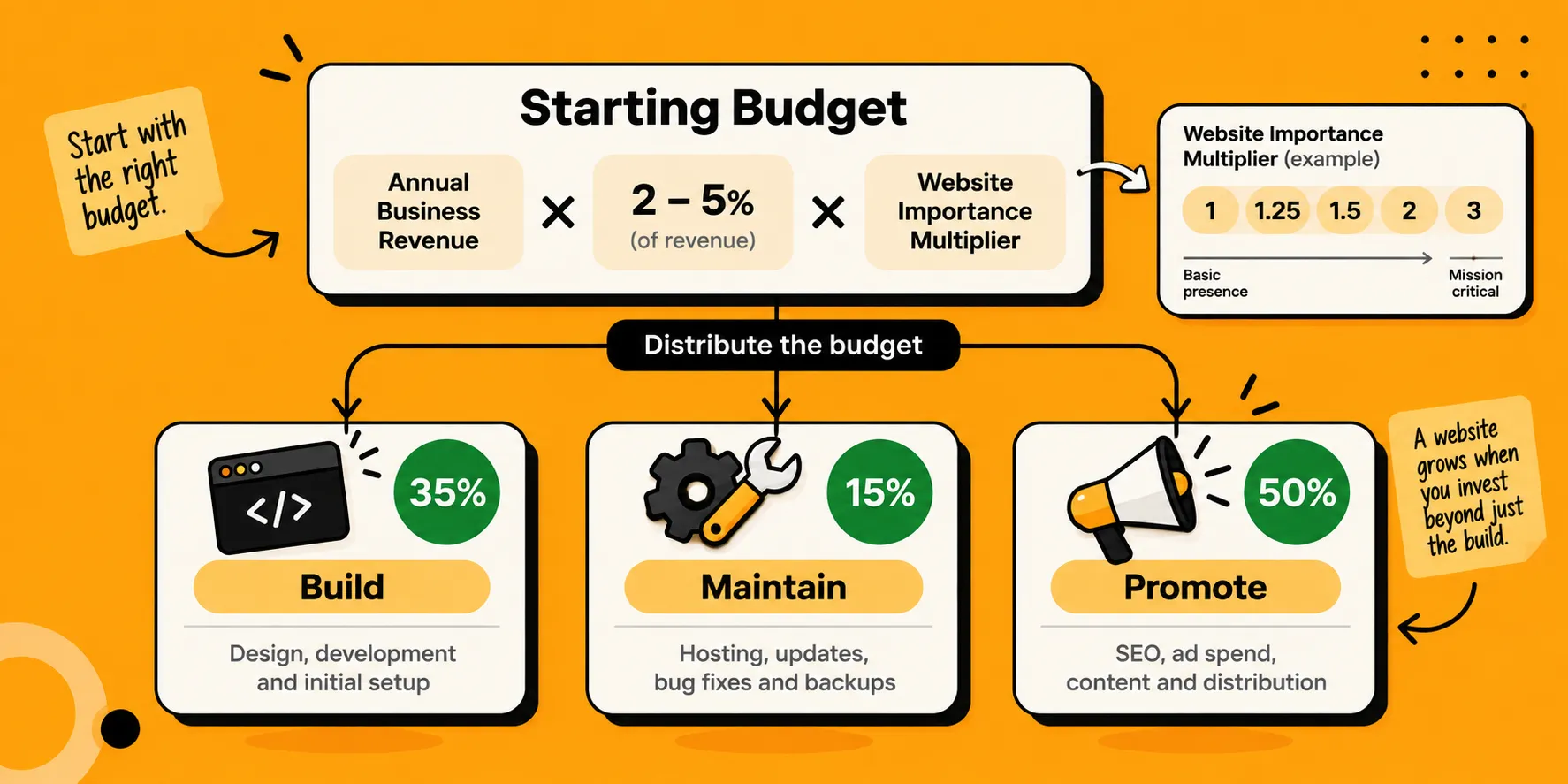
Starting Budget = Annual Business Revenue × 2–5% × Website Importance Multiplier
And we introduced the golden rule of website capital allocation:
Website Investment = Build (35%) + Maintain (15%) + Promote (50%)
Let’s apply this to reality:
Say your total annual digital budget is ₹2,00,000.
Build (35%): ₹70,000
Maintain (15%): ₹30,000 (roughly ₹2,500/month for hosting, domains, bug fixes, backups)
Promote (50%): ₹1,00,000 (SEO, ad spend, content distribution)
Now look at your requirements. If you have ₹70,000 for the build, you cannot realistically build a custom multi-vendor e-commerce marketplace or an enterprise client portal with deep ERP sync.
As we showed in How Much Does Website Development Cost in India?, ₹70,000 comfortably buys a custom-designed, high-performance static or CMS-driven business site with tailored lead-capture flows, clean tracking, and smooth mobile optimization.
Your budget doesn’t decide what your business desires. It decides what you can safely prioritize right now.
Mini Framework:
Set the Budget → Split the 3 Buckets → Match Build Cost to Reality → Prioritize Core JobsBuild what your business can operate today. You can expand features once the website generates cash flow to justify them.
Get the Business Ready, Not Just the Website
This is where the wheels fall off for most companies.
A website does not operate in a vacuum. It interacts directly with your team, your workflows, your software, and your inventory. If the operational machinery inside your office isn’t ready, launching a website will break your reputation faster than having no website at all.
Before launch, you must have clear answers for these five operational pillars:
1. PEOPLE → Who monitors inbound requests daily?
2. PROCESS → What exact steps follow a user submission?
3. PIPELINE → Where does the lead or transaction live?
4. FULFILMENT → Who delivers the product or service?
5. GOVERNANCE → Who holds ultimate ownership of the asset?
Let’s examine what operational readiness looks like across real business scenarios:
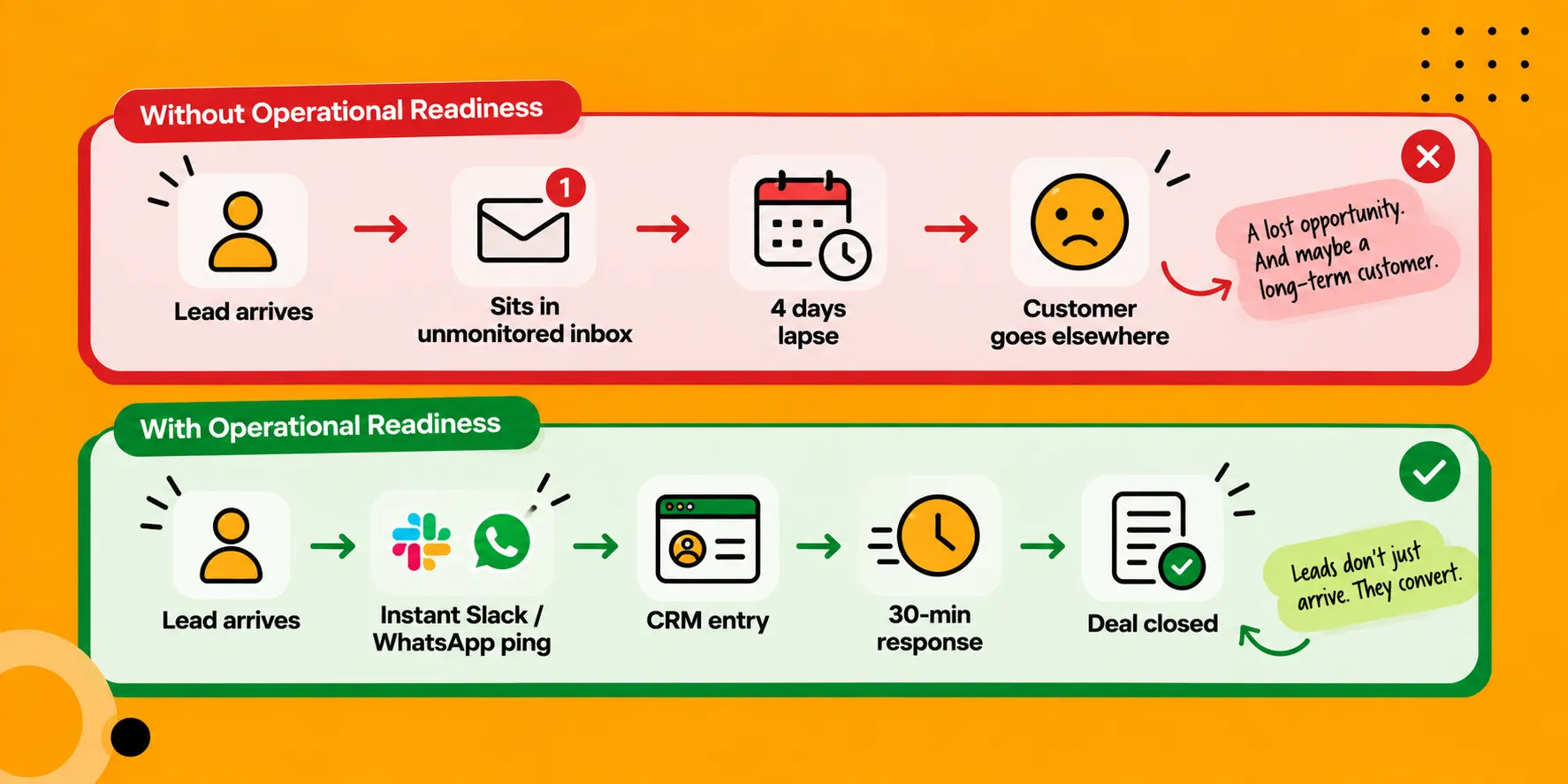
Scenario A: The Lead-Generation Service Business
The Action: A high-value prospect fills out a consultation request form at 2:00 PM on a Tuesday.
The Failure Mode: The notification lands in a generic inbox monitored by an executive who only checks it on Fridays. The lead goes cold. The prospect hires a competitor by Wednesday morning.
The Ready Business: The form submission instantly pings a dedicated #leads channel in Slack or sends an instant WhatsApp alert to the lead coordinator. An automated confirmation email lands in the prospect’s inbox in 30 seconds confirming receipt and detailing next steps. A designated sales rep calls within 60 minutes.
Scenario B: The Boutique E-Commerce Store
The Action: A customer orders a dress at 11:30 PM on a Saturday.
The Failure Mode: The order sits in the CMS database. Nobody checks physical stock until Monday afternoon, only to discover the fabric is sold out. The customer isn’t alerted for four days. They demand a refund and leave a 1-star Google review.
The Ready Business: Inventory levels are synced live with the warehouse. When the purchase completes, a courier pickup order is triggered automatically through a logistics API, a digital invoice is sent to the customer, and tracking details populate via automated SMS.
Scenario C: The Clinic or Consultant Booking System
The Action: A client books a 45-minute paid strategy session for Thursday at 4:00 PM.
The Failure Mode: The calendar wasn’t synced two ways with the consultant’s personal Google Calendar. The consultant is sitting in an offline client meeting when the virtual meeting room opens. The client is left staring at an empty Zoom screen.
The Ready Business: Real-time bi-directional calendar blocking prevents double-bookings. Automatic meeting links are generated instantly. Automated WhatsApp reminders fire 24 hours and 1 hour before the session.
Operational Tip: Before writing a single line of frontend code, map out your Post-Click Blueprint. Write down every internal human action that must occur from the second someone hits “Submit” to the moment the invoice is settled.
Assemble Your Assets Before You Build
Why do website builds drag on for six months past their deadlines?
It is almost never because the developers were late writing code. It is because the client disappeared for seven weeks trying to write their own “About Us” page, locate their high-resolution vector logo, or collect testimonials from past clients.
Every day your website sits in development limbo waiting for missing assets is money burning on the table.
Prepare your asset chest before you start development:
Brand Assets: Vector logo files (.SVG, .AI), brand color codes (HEX values), and official font typography licenses.
Core Messaging & Copy: Clear explanations of your offerings, value propositions, and positioning written from the perspective of what your customer gains (not an autobiographical company essay).
High-Res Imagery: Real photography of your actual team, office, facility, products, or client engagements. Stock photos of two people in suits shaking hands destroy credibility in seconds.
Proof & Social Validation: Client logos you have legal permission to show, detailed case studies with measurable metrics, and verified customer reviews.
Policies & Legal Pages: Privacy Policy, Terms of Service, Refund/Cancellation Policy, and Shipping terms (mandatory if you accept payments or run paid ads).
Technical Essentials: Domain DNS access, administrative access to your business email suite, and payment gateway merchant approvals.
The Working Principle: You don’t need every single asset 100% polished before development starts. But you must know what exists, what needs to be created, and who is individually responsible for delivering it before the sprint begins.
Plan for Launch, Not Just Development
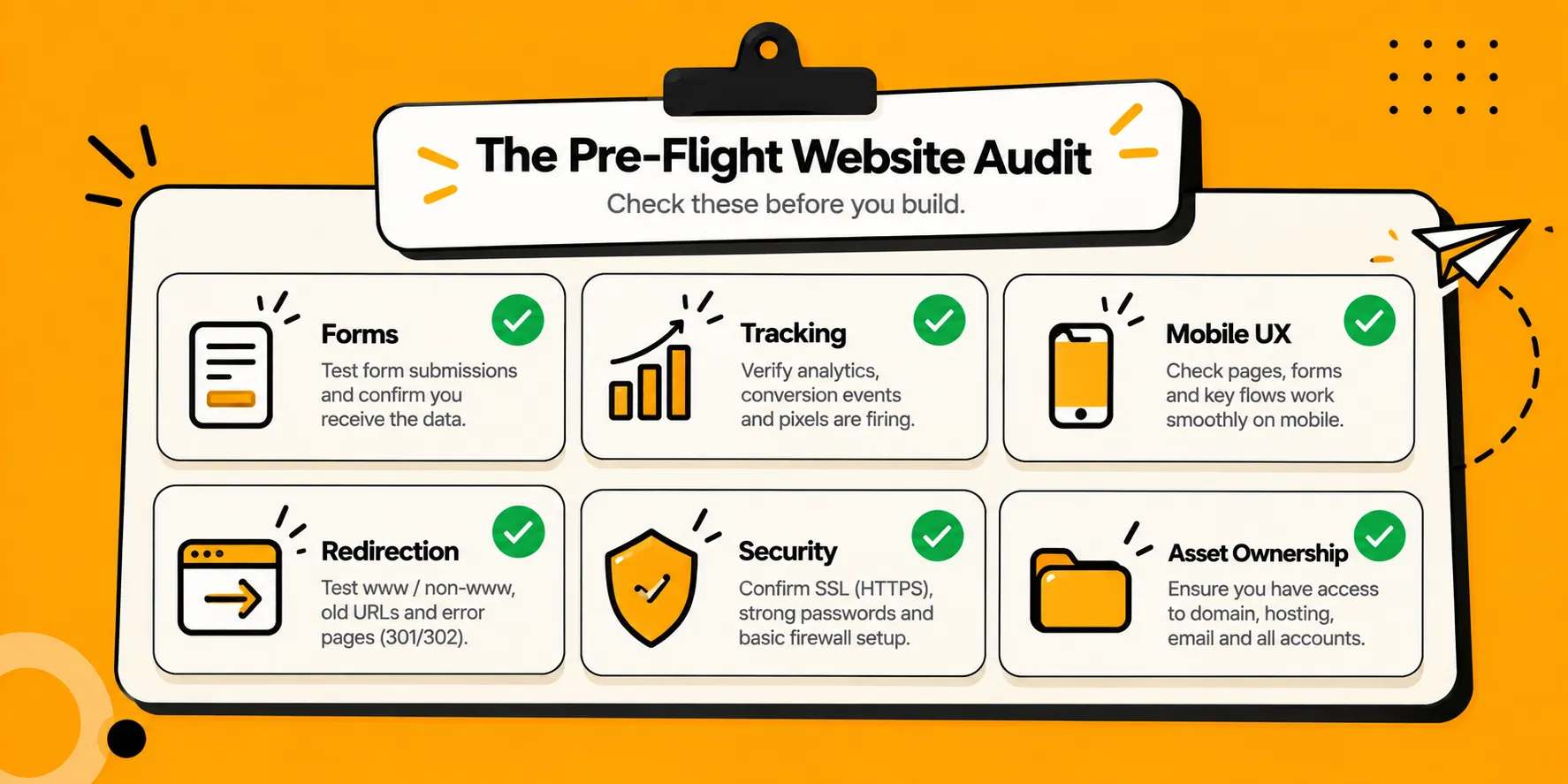
Development is building the race car. Launch is rolling it out onto the track under live race conditions.
A checklist prevents planes from crashing, and it prevents website launches from humiliating your brand. Do not hit the “Publish” switch until this operational launch audit is executed
If you don’t own your admin logins and your DNS settings, you don’t own your front door.
The First 30 Days Matter: Don’t Launch and Disappear
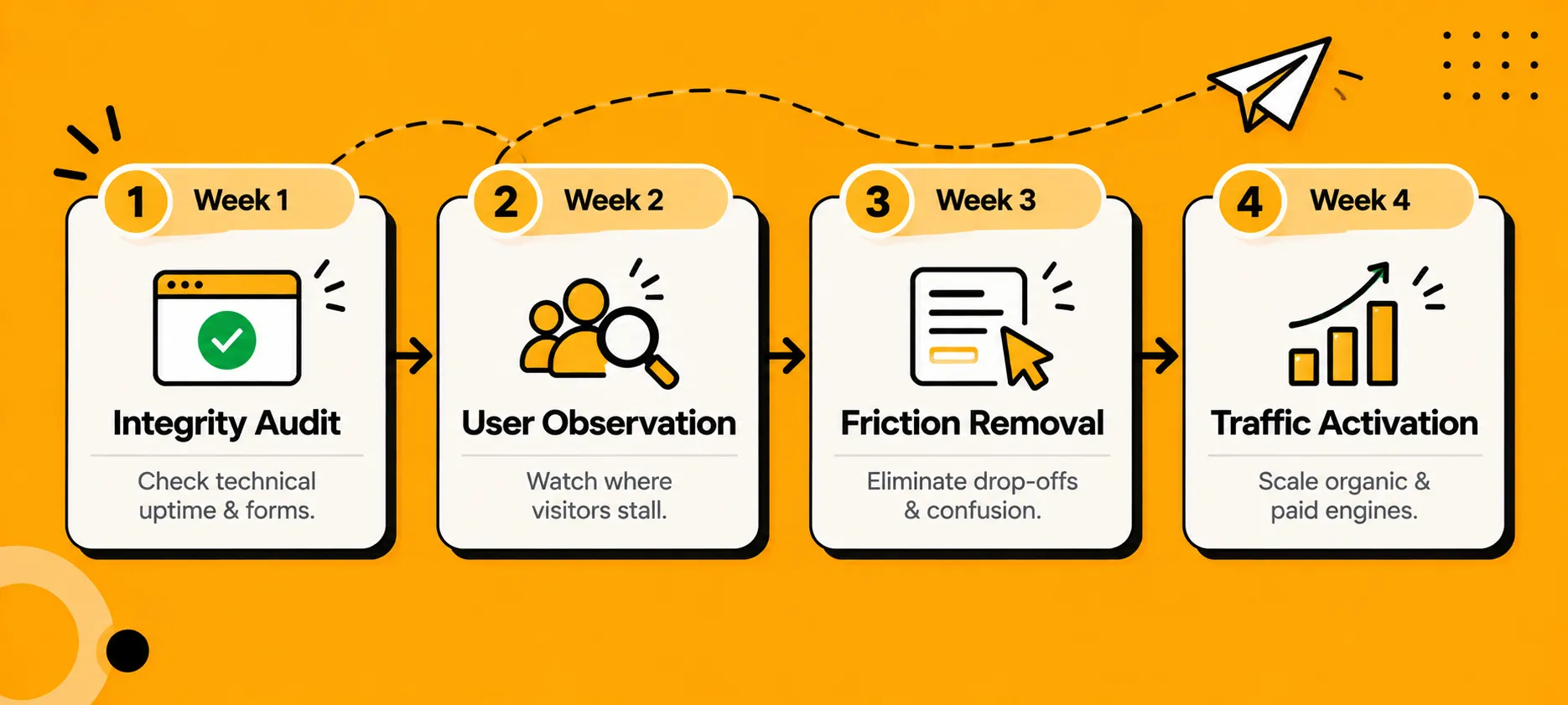
The biggest mistake founders make is treating launch day like the finish line of a marathon.
Launch day is simply Day 1 of operating a live digital asset. The real work begins the moment real human beings start landing on the site, clicking buttons, getting confused, or trying to buy.
Do not launch and disappear. Treat your first month as a controlled observation laboratory:
WEEK 1: INTEGRITY AUDIT → Check technical uptime & forms
WEEK 2: USER OBSERVATION → Watch where visitors stall
WEEK 3: FRICTION REMOVAL → Eliminate drop-offs & confusion
WEEK 4: TRAFFIC ACTIVATION→ Scale organic & paid engines
Week 1: The Integrity Audit
Check your logs daily. Did any form throw an unexpected server error? Are transactional emails arriving on time? Are users hitting broken 404 pages? Fix technical glitches instantly before you pump real traffic into the system.
Week 2: Watch Real Users Move
Use heatmaps and session recording tools (such as Microsoft Clarity or Hotjar). Watch where real people scroll, what they tap, where their cursors hesitate, and what they completely ignore. You will quickly discover that visitors are skipping the section you thought was brilliant and clicking on elements that aren’t even links.
Week 3: Friction Removal
Take the data from Week 2 and simplify. If users are dropping off halfway through your form, cut three unnecessary input fields. If visitors on mobile aren’t scrolling past the hero image, shorten the headline and bring the primary CTA up by 200 pixels.
Week 4: Traffic Activation
Now that the pipes are tested and the leak points are plugged, turn on the growth faucet. Spin up your search campaigns, roll out your organic content engine, launch your social campaigns, and send your announcement broadcast to your existing client list.
Mini Framework:
Launch → Observe → Optimize → Scale
The Website Is Live. Now Run It.
A website is an organic asset. Just like a physical office, a fleet of delivery trucks, or a retail store, the moment you neglect it, it begins to deteriorate.
To keep your digital front door converting month after month, embed these operational cadences into your business rhythm:
Monthly Maintenance (The 15% Bucket at Work)
Run CMS core, plugin, and security updates in a staging environment before deploying live.
Test checkout and lead forms end-to-end with real test submissions.
Review page speed performance metrics on Google PageSpeed Insights.
Verify automated off-site cloud backups are executing and uncorrupted.
Monthly Promotion & Content (The 50% Bucket at Work)
Review your GA4 analytics: Which referral sources deliver actual customers, and which send empty traffic?
Publish new case studies, customer wins, and educational articles that answer the specific sales questions your team answered this month.
Refine your ad targeting and landing page variants based on actual conversion rates, not vanity click-throughs.
A dead website repels high-value clients. A living, breathing, actively updated website tells the market that your company is thriving, disciplined, and attentive to detail.
Pull It All Together: The Complete Operating Blueprint
Before you spend your next rupee on web development, run your plan through the complete checklist:
1. PLAN THE JOB
└── Complete the sentence: "My website exists to ________ for my business."
└── Define the features and the backend systems required to support that job.
2. PLAN THE CAPITAL
└── Total Budget = Revenue × 2-5% × Importance Multiplier.
└── Split the capital: 35% Build | 15% Maintain | 50% Promote.
3. PREPARE THE BUSINESS
└── Identify who monitors notifications daily.
└── Design the post-click pipeline for every form, booking, or purchase.
└── Collect logos, brand assets, real photography, proof, and legal pages.
4. EXECUTE LAUNCH AUDIT
└── Test forms, payment webhooks, analytics pixels, mobile UX, and redirects.
└── Secure full legal ownership of domains, DNS, and hosting credentials.
5. RUN THE FIRST 30 DAYS
└── Week 1: Integrity | Week 2: Observation | Week 3: Fix Friction | Week 4: Scale.
└── Commit to monthly technical maintenance and continuous marketing promotion.
Start Here
If you take one lesson away from this guide, let it be this:
Stop asking developers: “How fast can you build this for me?”
Start asking your own team: “Are we ready to run this asset once it’s live?”
If you haven’t mapped out who handles incoming leads within 30 minutes, design your lead-handling pipeline before you buy a domain.
If you have ₹1,00,000 to invest, don’t spend ₹1,00,000 on development. Spend ₹35,000 on a razor-sharp build, save ₹15,000 for upkeep, and deploy ₹50,000 to bring the right buyers to your door.
If you’re building an e-commerce store, test your packing, courier integrations, and stock handling with 10 orders before you run ads to capture 500.
Build what your business can support. Run what you build with ruthless consistency. That is how a website stops being an expense on your profit-and-loss sheet and becomes your hardest-working revenue driver.
The Business Side of the Web
Understanding websites from the only perspective that actually matters: revenue, operational efficiency, customer trust, and long-term brand equity.
01 - It’s High Time Your Business Needs a Website ✓
02 - What Kind of Website Do You Actually Need? ✓
03 - How Much Does Website Development Cost in India? ✓
04 - How Much Should You Spend On Your Website? ✓
05 - Don’t Build a Website You’re Not Ready to Run ← You’re here
06 - What to Do After the Launch of Your Website (Coming Soon)
Ready to build a website backed by an operational engine that actually drives business growth?






Comments